Payroll year end is one of the most important points in the calendar for UK employers. It’s when you close off the tax year, report final figures to HMRC, and get everything in place for the year ahead, all while making sure employees receive the correct information and payments.
This guide walks through a practical payroll year end checklist for the payroll year end 2025, tailored for UK SMBs. We’ll explain what payroll year end is, outline each step you need to take, flag key dates, and highlight the legislative changes that could affect how you run payroll and payroll software in 2025/26.
What is payroll year end?
The payroll year end is the process of closing your payroll records for one UK tax year and submitting final reports to HMRC. It confirms that employee pay, tax, National Insurance and deductions are complete and accurate for that year. It involves submission of a final FPS (Full Payment Submission) and potentially Employer Payment Summary (EPS).
When is payroll year end?
The payroll year end is the process of closing your payroll records for one UK tax year and submitting final reports to HMRC. It confirms that employee pay, tax, National Insurance and deductions are complete and accurate for that year.
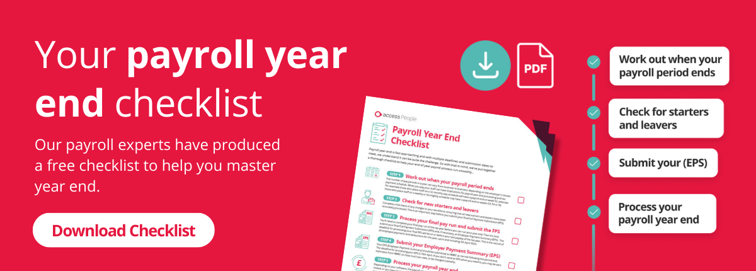
To help you get your ducks in a row, we’ve put together a payroll year end processing checklist with everything you need to do, some important dates for the diary and a downloadable checklist summarising these details.

Your payroll year end checklist 2025/26
Managing end of year payroll is much easier when you follow a clear, structured approach. We’ve put together a year end payroll checklist that breaks the process into manageable steps, explaining what to do, when to do it and why each stage matters, so nothing slips through the cracks.
Let’s look at each step in turn and how they fit together to keep your payroll year end compliant and stress free.
Step 1: Work out when your payroll period ends
Before you run any final submissions, you need to confirm when your last payroll period of the tax year ends. For most businesses, this will be the final pay date on or before 5 April, but the exact date depends on whether you pay weekly, fortnightly, four-weekly or monthly.
Getting this wrong can lead to earnings being reported in the wrong tax year, which affects employee tax records and can create avoidable HMRC queries. As part of your year end payroll checklist, double-check your pay calendar and make sure your payroll software is aligned with your actual pay frequency.
FAQ: If my pay is usually run monthly, e.g. on the 28th, do I need to create an additional pay schedule for payroll year end for the start of April?
No. Monthly payrolls require no special adjustments. Your end of year payroll is based on all payments that would have been made up until 5 April, so you would just run your March payroll as normal.
FAQ: If I run payroll fortnightly, how do I know which date to submit year end payroll in April?
Your end of year submission should include any usual payroll commitments you would have made prior to April 5th. So, for example, if you would normally pay employees on the Monday prior to the 5th April, that pay run would be the last one to be included in your submission. Any pay date that falls on or after 6th April 2025 is relevant to the new tax year.
FAQ: Is there week 53 this year?
As 2025 is not a leap year, you will not encounter a week 53 payroll when paying your weekly, fortnightly, or four-weekly payrolls. A week 53 payment occurs when there are 53 weekly pay days in the tax year.
Therefore, you will not need to make any special payroll adjustments for a week 53 during the 2025/2026 tax year.
Step 2: Check for new starters and leavers
Next, review your payroll records for any employees who joined or left during the tax year. Starters need correct starter information recorded, including their P45 or P46, and you should also confirm their tax code, National Insurance number, and bank details to avoid delays or errors in their pay.
Leavers must have leaving dates and final payments accurately recorded. Accuracy here is crucial because HMRC uses this data to update individual tax records. If these details are missing or incorrect, employees may end up paying too much or not enough tax, which can result in penalties for them or costly corrections for your business.
FAQ: If an employee leaves between running payroll and submitting the final FPS, do I process them as a leaver, or not?
Yes. If they are leaving in the current tax year, up to and including 5th April, enter their leaving date and make any necessary adjustments to their pay. You can then process the payroll again and submit the final FPS, happy in the knowledge that your payroll is correct for the tax year.
Step 3: Process your final pay run and submit the FPS
Your final payroll run for the tax year is where everything comes together. You’ll calculate final pay, deductions and statutory payments, then submit a Full Payment Submission (FPS) to HMRC on or before your employees’ pay date.
The FPS tells HMRC that this is your final submission of the year, so any mistakes can have a knock-on effect for both you and your employees. Payroll errors don’t just cause admin headaches; they can damage trust and lead to penalties, which is why it’s important to take extra care on this step of your payroll year end checklist.
FAQ: What if I need to make an extra payment to an employee after payday?
You’ll need to send another FPS for this prior to your next regular report.
FAQ: What do I do if a make a mistake on the FPS?
This depends on when you find the mistake:
- If you find the mistake whilst still in the current tax year, simply reprocess the payroll and resubmit the FPS.
- If you find the mistake after April 19, submit a correction to the FPS. This can normally be done via a ‘Previous’ or ‘Earlier Year FPS’ function.
Step 4: Submit your Employer Payment Summary (EPS)
If you need to claim Employment Allowance, recover statutory payments or report no payments made to employees, you’ll also need to submit an Employer Payment Summary (EPS). This ensures that HMRC adjusts what you owe correctly for the final period.
The EPS plays an important role in reconciling what you’ve paid employees with what you owe HMRC. Reviewing individual net pay against deductions at this point helps to ensure that totals make sense before you officially close the tax year.
FAQ: Do I need to send a new employer payment summary to HMRC to claim employment allowance?
Yes, you need to confirm with HMRC that you are claiming Employment Allowance at the start of each tax year. This will be sent on your first EPS of the tax year.
Step 5: Process your payroll year end
Once your final FPS and any EPS submissions are complete, you can formally process this within your payroll system. This step locks the year, produces final reports, and prepares your records for the new tax year.
This is also the time to review your internal reports for accuracy and store them securely for compliance purposes. Many SMBs find that automated payroll systems reduce the risk of errors here, as they guide you through year-end tasks and prevent accidental changes after the year is closed.
FAQ: If I have completed Year End and then find that an employee left in the previous tax year, what should I do?
Include the leaving information in the first FPS of the new tax year, with zero payment values and the relevant information, as follows:
- Their leaving date
- ‘0’ Pay and tax this period
- ‘0’ Year to date
- The normal pay date for the first period
If the employee was overpaid and is due to make a repayment for the previous tax year, you may need to submit a corrected FPS for that tax year.
If you use payroll software like ours, you can easily submit an earlier year end FPS with amended figures. We’d advise checking this in your software or with your provider directly if you’re unsure.
For a deeper dive into these insights, watch our full payroll year‑end webinar below, where we explore best practices, common challenges, and the latest tools to help you close the year with confidence.
Step 6: Prepare and share your P60s
After the tax year ends, you must provide a P60 to every employee who was on your payroll on 5 April. This document summarises their total pay and deductions for the year, and must be issued by 31 May.
Employees rely on P60s for important financial purposes like mortgage applications, tax returns and benefit claims, so delays or inaccuracies can cause real problems. Providing accurate P60s also helps to maintain trust with your staff and ensures that your business stays compliant with HMRC reporting requirements.
FAQs: Do I need to provide a P60 to leavers?
If an employee leaves before 5th April you do not need to provide a P60. However, they are entitled to request a P60, if they wish.
Step 7: Check for tax code changes and prepare for the new tax year
As you move into the new tax year, HMRC will issue updated tax codes for some employees. These usually arrive via payroll notices and need to be applied from the first pay run after 6 April.
Failing to update tax codes can result in employees paying too much or too little tax, leading to complaints and corrections later on. It’s important to stay on top of updates to relevant legislation, such as the change to tax code 1257L, which means that some employees may have their personal allowance adjusted or taxed differently depending on their circumstances. Reviewing current employment laws as part of your year end payroll checklist helps to ensure that your payroll is ready for the new tax year
FAQ: If employee tax codes need changing, when should I do this and which forms do I need?
Before processing the first payroll of the new tax year, you’ll want to refer to HMRC’s P9X document for the latest PAYE tax code changes. HMRC will also send a P9T paper form - or online notification if you’re registered for the internet service - with instructions if any of your employees’ tax codes change. You’ll need to ensure these changes are updated in your payroll software, or wherever you manage your payroll, from April 6th, the start of the new tax year.
FAQ: Are there any tax code changes for the 2025-26 tax year?
For the 2025-26 tax year, there are no changes to the PAYE thresholds. This means that there will be no generic uplift of tax codes via a P9X form. However, some employees may receive individual tax code changes depending on their circumstances and these will be delivered via a P9T form or notification from HMRC. Some payroll software will be able to download these tax codes changes for you – please check with your payroll provider if you are not sure.
FAQ: How will new tax codes affect National Insurance payments?
Tax codes do not affect National Insurance payments. National Insurance is calculated based on the employee’s NI Letter.
Step 8: Report expenses, benefits and P11Ds
If you provide taxable expenses or benefits, you’ll need to report these to HMRC. Traditionally, this has been done using P11D forms, with deadlines falling after the end of the tax year. However, following upcoming changes that will remove the P11D, employers are moving to benefits in kind payrolling, where benefits are reported and taxed through payroll in real time instead.
Accurate reporting is essential, as errors can lead to underpaid tax and National Insurance. Reviewing P11D forms and common benefits such as company cars, private medical insurance, and childcare vouchers at this stage helps you to understand what needs to be reported and ensures that benefits are correctly reflected before you move fully into the next payroll year.
FAQs: I’d like to start payrolling my employee benefits, what do I need to do?
If you would like to start payrolling your employee benefits please check with your payroll provider first as some payroll software is not able to accommodate this. If your software is able to payroll benefits, you must register with HMRC before the start of the tax year, otherwise you will need to use the standard P11Ds forms. You cannot start payrolling benefits mid-year.
FAQs: I have made an error on my P11D and have already submitted to HMRC, what should I do?
As HMRC will only accept one submission for P11Ds and are no longer accepting paper forms, they have created P11D and P11D(b) correction forms. You will need to sign into the Government Gateway to make the necessary changes.
Key dates for payroll year end 2025
Keeping track of deadlines is a core part of any year end payroll checklist. Missing key dates during end of year payroll can lead to penalties and unnecessary stress, so it’s worth having these clearly documented and shared internally.
Here’s a quick guide to the key dates:
- 5 April 2026: End of the 2025/26 tax year
- On or before final pay date: Submit final FPS
- By 19 April 2026: Submit EPS if required
- 6 April 2026: Start of the 2025/26 tax year
- By 31 May 2026: Provide P60s to employees
- By 6 July 2026: Submit P11D and P11D(b) forms, if applicable
Important changes to be aware of for payroll year end 2025/26
This isn’t just about closing the books; it’s also about preparing for what’s coming next. Legislative changes often take effect from April, so early preparation helps to ensure compliance and avoids last-minute scrambles.
Several updates for 2025/26 affect costs, reporting and employee entitlements, making it especially important to review your payroll processes ahead of time.
National Insurance and Employer Reliefs
From April 2025, the Employer Class 1 National Insurance rate increased to 15%, while the Secondary Threshold reduced to £5,000. This change directly affects employer payroll costs, particularly for growing SMBs.
At the same time, Employment Allowance increased to £10,500 with wider eligibility, and Small Employers Relief compensation rose to 8.5%. Understanding how these changes interact with your payroll year end figures helps you to forecast costs accurately for the year ahead.
Pay rates and statutory payments
National Living Wage and National Minimum Wage rates were updated from 1 April 2025, which may require changes to pay structures and budgets. There was also the introduction of Statutory Neonatal Care Pay, offering up to 12 weeks of support for eligible parents.
Weekly rates for statutory family payments and Statutory Sick Pay were also updated. These changes affect payroll calculations directly, so they should be factored into your planning.
Taxation and reporting changes
The income tax personal allowance remains frozen at £12,570, although Scottish income tax bands continue to change. Employers with staff across different regions need to be especially vigilant.
Looking ahead, mandatory real-time reporting of most Benefits-in-Kind will be introduced from April 2026, replacing traditional P11D forms. While this doesn’t apply immediately, understanding the upcoming changes and their impact helps businesses to prepare systems and processes early.
Key actions for employers
Finally, let’s sum things up with a list of the key actions you need to take as an employer to implement these changes when preparing for payroll year end:
- Review and update payroll software to reflect new rates and thresholds
- Reassess budgets based on increased employer NIC costs
- Communicate pay and statutory changes clearly to employees
- Check eligibility for allowances, reliefs and statutory payments
Streamline your end of year payroll with PeopleHR
The payroll year end is a critical moment for UK SMBs, combining compliance, accuracy and forward planning. Following our structured payroll year end checklist helps to ensure that your submissions are correct, employees receive the right information, and your business is ready for the new tax year.
PeopleHR’s payroll tools are designed to support every stage of the process, from accurate calculations to automated reporting. With integrated guided workflows and clear audit trails, you can reduce errors and save time during even the busiest periods.
If you’d like to see how it works in practice, you can explore a demo or speak to our team to see how PeopleHR can support your next year end.
You might be interested in:
If you enjoyed this article, you may be interested in reading:
- Payroll Compliance Guide [Checklist Included]
- A Guide to Understanding Payroll Reports
- A Comprehensive Guide to Payroll Management